How to get an Anthropic API key (2026 step-by-step guide)
Get your Claude API key for Opus, Sonnet, and Haiku models
Anthropic's API keys (managed through Claude Platform) give you access to Claude models. You need a Claude Platform developer account — separate from a Claude.ai subscription.
sk-ant-api03-Claude API usage is billed separately from Claude Pro or Max. Review Claude Platform for the credits, payment options, and limits available to your account.
How to get an Anthropic API key
Create an API key in Claude Platform, add the credits or billing option shown for your workspace, and connect the key to MultimodelChat. Claude Pro and Max subscriptions are separate from API usage.
- Create or sign in to a Claude Platform account
- Open Settings, then API Keys
- Create a key and copy it before closing the dialog
- Add API credits or billing if Claude reports a low balance
Connect it to MultimodelChat
Once you have the required credentials, start your free trial, add this provider in Settings, and save the connection. MultimodelChat encrypts the API key before storing it.
Available models on Multimodel Chat
Step-by-step guide
Create a Claude Platform Account
Sign up at platform.claude.com.
- Go to https://platform.claude.com
- Choose "Continue with Google" or "Continue with email"
- For email sign-up: enter your email and create a password
- Verify your email via the confirmation link
- Complete phone verification (SMS code)

Navigate to API Keys
Find the API Keys section in settings.
- From the left sidebar, click Settings → API Keys
- Direct URL: https://platform.claude.com/settings/keys
- You'll see a list of any existing keys with their status and usage

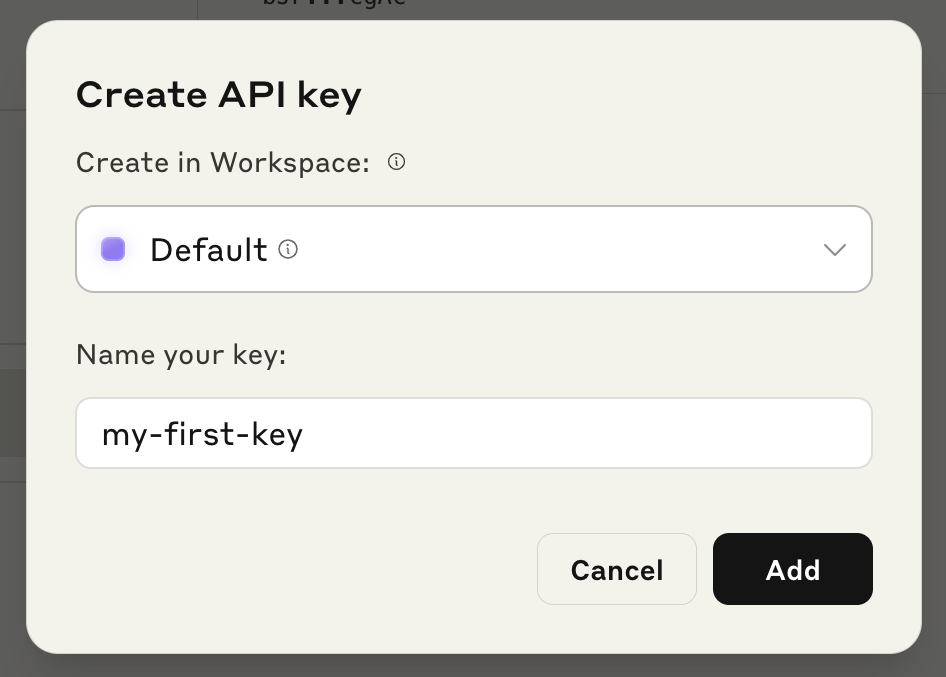
Create a New API Key
Generate your key with a name and workspace.
- Click "+ Create Key" (top-right)
- Enter a descriptive name (e.g., "Multimodel Chat")
- Select a Workspace (use "Default" if you're just starting)
- Click "Create API Key"
Copy and Save Your Key
Your key is shown only once.
- Copy the key immediately — it's shown only once
- Format: sk-ant-api03-xxxxxxxxxxxxxxxxxxxxxxxxxxxx... (~108 characters)
- Store securely in a password manager
If you lose the key, you must revoke it and create a new one. There is no way to reveal it again.
Configure API Billing
Set up the billing option shown for your Claude Platform account.
- Go to Billing in the left sidebar
- Review the available payment or credit options
- Set a spend limit or auto-reload preference if available
Claude subscriptions do not include Claude API usage. API billing is managed separately.
Add Your Key to Multimodel Chat
Connect your key in Multimodel Chat settings.
- In Multimodel Chat, go to Settings → API Keys
- Select Anthropic as the provider
- Paste your API key
- Click Save
Common issues
Swipe horizontally to see the full table.
| Issue | Fix |
|---|---|
| Credit balance too low | You must purchase credits — even free credits need to be claimed |
| Key not working | Ensure no leading/trailing whitespace; keys are case-sensitive |
| Workspace not found | Check you're in the correct workspace for this key |
| Key revoked | Go to API Keys page, check status, create a new key if needed |
Frequently asked questions
Do I need a Claude Pro subscription?
No. API access is completely separate from Claude Pro subscriptions. You need an API key from the Claude Platform, which uses prepaid credits.
What happened to console.anthropic.com?
The old console.anthropic.com now redirects to platform.claude.com. All API key management is done at the new URL.
Set up another provider
Related guides
Provider requirements and pricing last reviewed August 24, 2026. Check the linked provider documentation for current terms before purchasing credits.
Ready to connect your Anthropic key?
Paste your API key and Multimodel Chat tests it live against the provider before saving. The key is encrypted in this browser's vault and used only for your requests.
Start the 7-day free trialNew to the workflow? See how it works in three steps